Participating in a MAP

What is a MAP?

A MAP or Multi Animator Project is a project were many animators come together and animate small sections, mostly to a piece of music and is then edited together by the host to create one final video. MAPs often provide a good ground to improve an animators skill set as they can experiment and work with different camera shots to create an interesting addition to the project.

Here is an example of a completed MAP

Joining a MAP

In order to join a MAP you first need to look for a MAP call or a MAP host. These are usually videos that a MAP host has edited together with numbers marking each part. The parts are then claimed by animators and they then have a certain amount of time to complete it. This video goes more in depth as to what MAPs you can join and other rules and scripts that one might have to follow to join the MAP.

To join the MAP I firstly looked up open MAP into Youtube and looked through the available MAPs I could join. This one in particular caught my attention so I quickly grabbed the last part.

Next off for this was to get a sketch ready. This is very important to do as it provides evidence for the MAP host that you are working on the project.

This is very much just a basic sketch as to what I want to have in my part for the project. If I had wanted to be more clear for myself in the future I would have also used arrows and movement to indicate the camera movement. But as I am currently working on this pretty much full time I felt that it wasn’t too necessary. After this I then went and lined everything.

Creating Walk, Trot and Run Cycles

In order to further progress my skills, I decided to produce a series of different cycles based on our dog Tottie. Cycles are an important thing to get the hang of as they provide more interesting animation and can also be adapted and changed to better suit the acting of the character portrayed.

Walk

First off I went off and looked at real life references and online references for a dog walk cycles. It is important to do this because without it, it would look unnatural and less suited to fit with our perception of reality.

I used these clips to help me as they provided the clearest image and also noted certain features of each gait like in which order the feet went off the floor. Another couple of tips I picked up while animating the walk cycle were tips on how to make my animation look less wobbly and unstable by minimizing my brush size and making it more of a solid brush, how to line properly by practicing certain techniques and how to make animating the opposite legs easier by using the previous drawings to trace over and swap the legs from back to front and vice versa.

This is the sketch I made for the walk cycle. Overall I’m pretty pleased with the general movement of the loop, however the head still needs some work. While producing this sketch I also watched a video on how to animate walk cycles which helped a lot especially with making the animation look more three dimensional.

This is the final linework for the walk cycle. At first my lines were way too thick which caused the animation to look choppy and unstable but all I needed to do was make my brush smaller. Another thing I fixed was the head. I simply copied and pasted the head without the ears and manipulated it each time to make it bob up and down before adding the ears.

This is the final walk cycle. It took quite a while to figure out how the spots near the tail were going to move but after a couple times of trail and error I managed to figure it out.

So far doing this little practice project is helping me improve in more ways than one, helping me learn how to get my animation to the quality I want it to be.

Day 4 – COTF19

Last night before going to bed I went onto Udemy and looked at a couple of courses in script writing, story boarding and animation.

I first worked through the short course in script writing. At first the program that he used was not available any more however I luckily found a quick and free alternative to it and went along and created a basic script. I also began to look at the story boarding course and downloaded the story board template ready for today.

I’m still trying to figure out the colour scheme for Forest but I’m thinking that a turquoise on the tail and arms still like the original scheme, dark yellow hair and dark skin with an orange or red hue.

Today I plan on finalising my designs for both Forest and Muddy and possibly come up with a couple of character sheets of them before beginning the story boarding process, working alongside the short course to help better my understanding of how a story board is meant to work and how it will help me better simplify the animatic process and animation process.

After watching it for a bit and opening up the template I had a go at getting down some basic ideas for the beginning of the animation as that was what I had most clear in my head.

I have also finally picked the song that I’m going to have running along side it: The Curse of the Fold by Shawn James. I feel that the story will play off it very well and it also gives off the Westernesque vibe that I want for the rest of the project.

Day 3 – COTF19

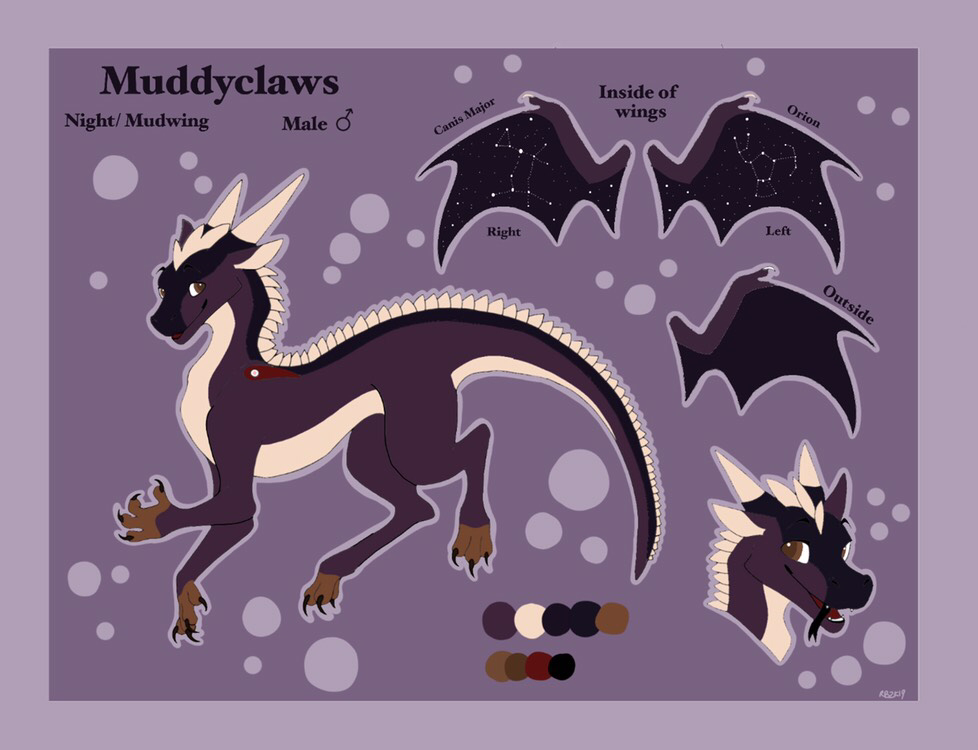
Today I began to repurpose Muddyclaw’s design to be less of a Wing of Fire oc and to make him easier to animate.

First off I took my old design as well as a reference sheet I commissioned from an artist and took the fundamental points of the design into account. I noted where all the specific colours where and specific markings I wished to keep. I also took inspiration from a design for a dragon that I saw recently that included adding feathers on the edges of the wings and some fin-like spines down the back and fins on the tail. Next I went to research into how I wanted Muddy to move. I first looked through reference for cats but felt that, because he’s so big, it would be difficult to make that look authentic. Next I looked at wolves and dogs and felt that, if I slowed down the timing a bit in the walk cycles I would get the outcome I wanted. At this time I had also found an artist to study, Milt Kahl.

I do still think that the first character needs to have a look at in terms of colour, but I did like the basic colours I’ve come up with. However after some experimenting I came up with a more contrasting colour palette to Muddyclaws’ design and named him Forest. I also didn’t realise this until now that Forest has brown on top and Muddy has brown on the bottom.

I also started looking at different artists and animators that I could research for inspiration. I already had one animatic in mind for an analysis, The Church by EmptFeet on Youtube. I had bought their concept design booklet from it and went to print it out but unfortunately the printer ran out of ink. I also looked at an animatic called Shut Eye by Raquel M Simoso which is based around the artists comic book No North. Again I purchased the book of the art surrounding it ready to use for an analysis.

After this I then looked at one of my favourite Disney animators Milt Kahl as I had previously rewatched both 101 Dalmatians and Lady and the Tramp. After watching them I felt very inspired and will also rewatch the Aristocats, a Disney animated film that I want to take inspiration from for the use of sketchy lines in the animation that I absolutely love.

Day 1- COTF19

Today I properly began to start my project. I put all the images I found into a Photoshop file and printed it out. I did want it to fit over a spread but in the end I like how it turned out.

After this I then began to think of ideas for my idea and then began to design the first character. I do feel that, because I had a basic design in my head, I drew a certain design better than the others. I still need to figure out what his colour scheme will be and the style of clothing he’ll wear.

Also during this process I changed my idea so that there will only be two characters as opposed to the original three. This is because it’ll take less time to design two characters and less time to animate.

Design a site like this with WordPress.com
Get started